
Cascaded Shadow Map은 거리에 따라 depth map이 할당 받는 월드의 영역을 다르게 해서, viewer와 가까운 곳은 texel의 density를 높이는 방식입니다.
주로 Directional Light에 사용됩니다.(Directional light는 월드 전체를 대상으로 하기 때문에)
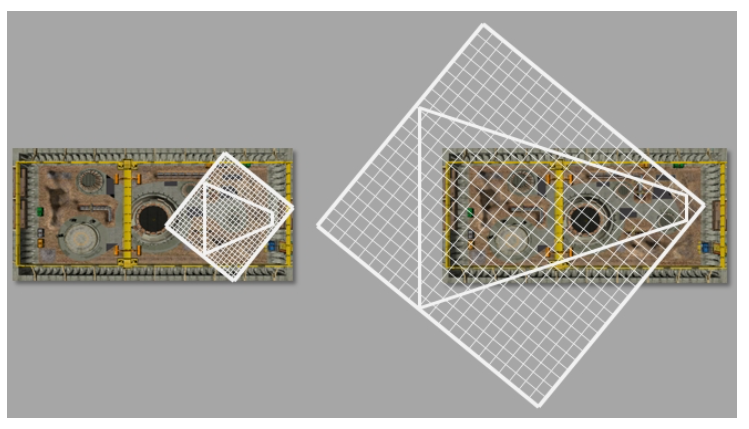
가까운 거리는 왼쪽처럼 Shadow Map의 grid가 촘촘한게 그림자의 퀄리티에 좋을 것이고, 멀리 있는 물체의 그림자는 우측 처럼 grid가 널널해도 충분히 괜찮을 것이다.
1. Split View Frustum
View Frustum기준 near ~ far plane 사이에 cascade 수 만큼 나눈다. ( 얼마나 나눌 지는 인자로 설정하면 된다.)
여기서 Frustum을 나누는 방법도 중요하다.
카메라와 가까이 있는 곳은 촘촘히 멀리있는 곳은 넓게 쪼개는게 효율이 좋기 때문이다.
linear하게 나누면 가까운 곳이 촘촘하지 못하고,

log split으로 나누면 가까운 곳이 너무 촘촘해지고, 먼 곳은 너무 간격이 넓어진다.
(원하는게 참 많죠)
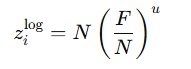
그래서 적절히 섞어서 사용해줘야한다.

TArray<float> ComputeCascadeSplitDistances(float nearZ, float farZ, uint32 numCascades, float lambda)
{
    TArray<float> splits;

    if (numCascades < 1 || nearZ <= 0.0f || farZ <= nearZ)
    {
        // Fallback: single split covering [nearZ, farZ]
        splits.push_back(nearZ);
        splits.push_back(farZ);
        return splits;
    }

    splits.resize(numCascades + 1);
    splits[0] = nearZ;
    splits[numCascades] = farZ;

    const float n = nearZ;
    const float f = farZ;
    const float invCount = 1.0f / static_cast<float>(numCascades);
    const float clampedLambda = std::clamp(lambda, 0.0f, 1.0f);

    for (uint32 i = 1; i < numCascades; ++i)
    {
        float si = static_cast<float>(i) * invCount;
        // Linear split: equally spaced in view depth
        float linear = n + (f - n) * si;

        // Logarithmic split: constant ratio in view depth
        float logv = n * std::pow(f / n, si);

        // Practical split: blend
        splits[i] = linear * (1.0f - clampedLambda) + logv * clampedLambda;
    }

    // Ensure strict monotonic increase (robustness)
    for (uint32 i = 1; i <= numCascades; ++i)
    {
        if (splits[i] <= splits[i - 1])
        {
            splits[i] = std::nextafter(splits[i - 1], std::numeric_limits<float>::infinity());
        }
    }

    return splits;
}
2. 얻은 Z_view값을 NDC좌표로 옮겨서 나눠진 View Frustum의 각 꼭짐점 좌표를 가져온다.
(이제 View Frustum의 일부를 Subfrustum이라고 하겠습니다.)
Split된 view-space에서의 z좌표를 NDC에서의 z로 변환한다.
그렇게 되면, Z를 바탕으로 Subfrustum들의 NCD에서의 xy를 알 수 있다.
즉, Subfrustum의 모든 꼭지점 좌표를 알 수 있다는 것이다.
TArray<FVector2> ComputeCascadeNdcZRanges(float nearZ, float farZ, const TArray<float>& splitsView, bool isPerspective)
{
    TArray<FVector2> ranges;
    if (splitsView.size() < 2)
        return ranges;

    const uint32 numCascades = static_cast<uint32>(splitsView.size() - 1);
    ranges.resize(numCascades);

    for (uint32 i = 0; i < numCascades; ++i)
    {
        float vNear = splitsView[i];
        float vFar = splitsView[i + 1];
        float ndcNear = ViewZToNDC(vNear, nearZ, farZ, isPerspective);
        float ndcFar = ViewZToNDC(vFar, nearZ, farZ, isPerspective);
        ranges[i] = FVector2(ndcNear, ndcFar);
    }
    return ranges;
}

TArray<TArray<FVector>> BuildCascadeCornersNDC(float nearZ, float farZ, const TArray<float>& splitsView, bool isPerspective)
{
    TArray<TArray<FVector>> cascades;
    if (splitsView.size() < 2)
        return cascades;

    auto ranges = ComputeCascadeNdcZRanges(nearZ, farZ, splitsView, isPerspective);
    cascades.resize(ranges.size());

    for (size_t i = 0; i < ranges.size(); ++i)
    {
        const float zN = ranges[i].X; // near NDC
        const float zF = ranges[i].Y; // far NDC

        TArray<FVector> corners;
        corners.resize(8);

        // Near plane (BL, BR, TL, TR)
        corners[0] = FVector(-1.0f, -1.0f, zN);
        corners[1] = FVector(1.0f, -1.0f, zN);
        corners[2] = FVector(-1.0f, 1.0f, zN);
        corners[3] = FVector(1.0f, 1.0f, zN);

        // Far plane (BL, BR, TL, TR)
        corners[4] = FVector(-1.0f, -1.0f, zF);
        corners[5] = FVector(1.0f, -1.0f, zF);
        corners[6] = FVector(-1.0f, 1.0f, zF);
        corners[7] = FVector(1.0f, 1.0f, zF);

        cascades[i] = std::move(corners);
    }

    return cascades;
}
3. NDC좌표를 다시 World Space로 가져온다
NDC 공간에서 만든 각 Subfrustum의 꼭지점들을 Inverse View-Projection matrix로 변환해 World Space 좌표로 복원한다.
TArray<TArray<FVector>> BuildCascadeCornersWorldFromNDC(const FMatrix& invViewProj, const TArray<TArray<FVector>>& cornersNDC)
{
    TArray<TArray<FVector>> cascadesWS;
    cascadesWS.resize(cornersNDC.size());

    for (size_t ci = 0; ci < cornersNDC.size(); ++ci)
    {
        const auto& cNDC = cornersNDC[ci];
        TArray<FVector> cWS;
        cWS.resize(cNDC.size());

        for (size_t i = 0; i < cNDC.size(); ++i)
        {
            const FVector& ndc = cNDC[i];
            const FVector4 worldH = invViewProj.TransformHomogeneous(ndc);
            if (std::abs(worldH.W) < 1e-6f)
            {
                cWS[i] = FVector(0.0f, 0.0f, 0.0f);
            }
            else
            {
                cWS[i] = FVector(worldH.X / worldH.W, worldH.Y / worldH.W, worldH.Z / worldH.W);
            }
        }

        cascadesWS[ci] = std::move(cWS);
    }

    return cascadesWS;
}
4. Subfrustum을 Light View Space로 옮긴다.
FMatrix BuildDirectionalLightView(const FVector& lightDirection, const FVector& targetPosition, float viewOffset)
{
    FVector forward, right, up;
    BuildLightBasis(lightDirection, forward, right, up);

    // Place the eye behind the target along -forward
    FVector eye = targetPosition - forward * viewOffset;

    return FMatrix::CreateViewFromAxes(eye, right, up, forward);
}
5. Subfrustim에 맞는 AABB생성
light view space로 옮긴 8개 점의 min/max x,y,z를 구해서 AABB를 만든다. 이 AABB는 해당 구역(subfrustum)이 영향을 끼치는 범위를 의미한다.
TArray<FAABB> ComputeLightSpaceAABBs(const TArray<TArray<FVector>>& cascadesLightSpace)
{
    TArray<FAABB> result;
    result.resize(cascadesLightSpace.size());

    for (size_t ci = 0; ci < cascadesLightSpace.size(); ++ci)
    {
        FAABB box;
        for (const auto& p : cascadesLightSpace[ci])
        {
            box.Min.X = std::min(box.Min.X, p.X);
            box.Min.Y = std::min(box.Min.Y, p.Y);
            box.Min.Z = std::min(box.Min.Z, p.Z);
            box.Max.X = std::max(box.Max.X, p.X);
            box.Max.Y = std::max(box.Max.Y, p.Y);
            box.Max.Z = std::max(box.Max.Z, p.Z);
        }
        result[ci] = box;
    }
    return result;
}
6. Orthographic Matrix를 통해 투영시킨다.
위에서 얻은 AABB를 감싸는 Othographic Projection Matrix를 생성한다.
평행광이기 때문에 Perspective 가 아닌 Orthographic Projecion을 사용한다.
TArray<FMatrix> BuildOrthoFromAABBs(const TArray<FAABB>& aabbs)
{
	TArray<FMatrix> proj;
	proj.resize(aabbs.size());
	for (size_t i = 0; i < aabbs.size(); ++i)
	{
		const auto& b = aabbs[i];
		// DirectX off-center orthographic: left, right, bottom, top, near, far
		proj[i] = FMatrix::CreateOrthographicOffCenter(b.Min.X, b.Max.X, b.Min.Y, b.Max.Y, b.Min.Z, b.Max.Z);
	}
	return proj;
}

TArray<FMatrix> BuildCascadeLightVP(const FVector& lightDirection,
    const TArray<TArray<FVector>>& cascadesWorld,
    float viewOffset,
    TArray<FMatrix>& ViewMatix,
    TArray<FMatrix>& ProjMatrix)
{
    // 1) World -> Light space
    auto cascadesLS = TransformCascadesToLightView(lightDirection, cascadesWorld, viewOffset);
    // 2) AABB fit
    auto aabbs = ComputeLightSpaceAABBs(cascadesLS);

    // 3) Ortho
    auto proj = BuildOrthoFromAABBs(aabbs);

    // 4) Rebuild view per cascade (same as in step 4) and compose VP
    TArray<FMatrix> lightVP;
    lightVP.resize(cascadesWorld.size());
    ViewMatix.resize(cascadesWorld.size());
    ProjMatrix.resize(cascadesWorld.size());
    for (size_t ci = 0; ci < cascadesWorld.size(); ++ci)
    {
        // Compute center again for the view placement
        FVector center(0.0f, 0.0f, 0.0f);
        for (const auto& p : cascadesWorld[ci])
        {
            center.X += p.X; center.Y += p.Y; center.Z += p.Z;
        }
        center.X /= static_cast<float>(cascadesWorld[ci].size());
        center.Y /= static_cast<float>(cascadesWorld[ci].size());
        center.Z /= static_cast<float>(cascadesWorld[ci].size());

        FMatrix view = BuildDirectionalLightView(lightDirection, center, viewOffset);
        lightVP[ci] = view * proj[ci];

        ViewMatix[ci] = view;
        ProjMatrix[ci] = proj[ci];
    }
    return lightVP;
}
7. subfrustum들의 depth map을 얻을 수 있게 된다. lighting을 할 때 적절한 depth map을 사용하면 된다.
Directional Light의 shadow를 구할 때,
위에서 얻은 Depth map들을 Texture2DArray에 저장한 뒤, lighting 단계에서 픽셀의 camera view-space z로 어떤 cascade를 사용할 지 정하고 샘플링합니다.
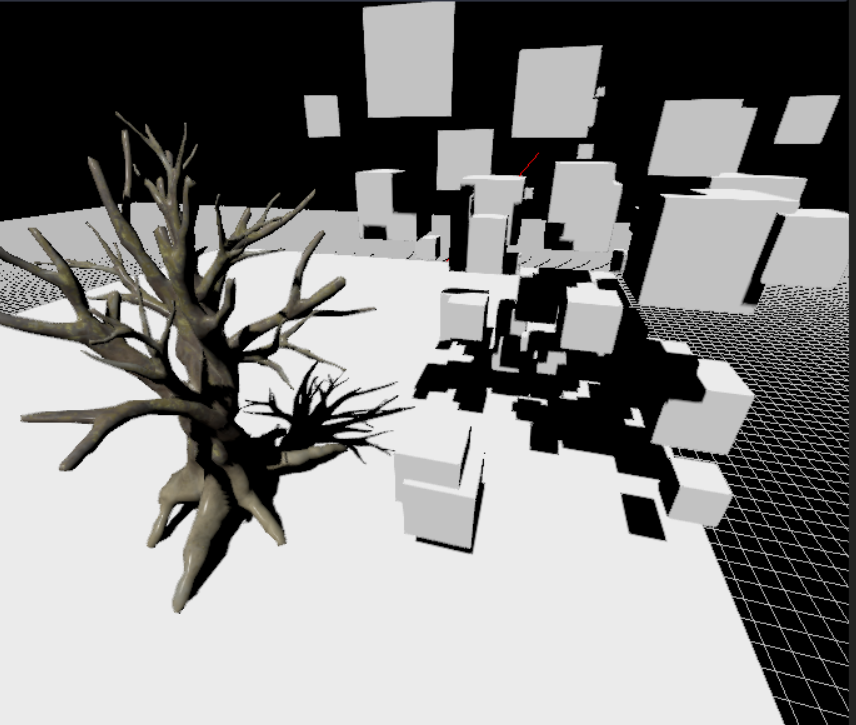
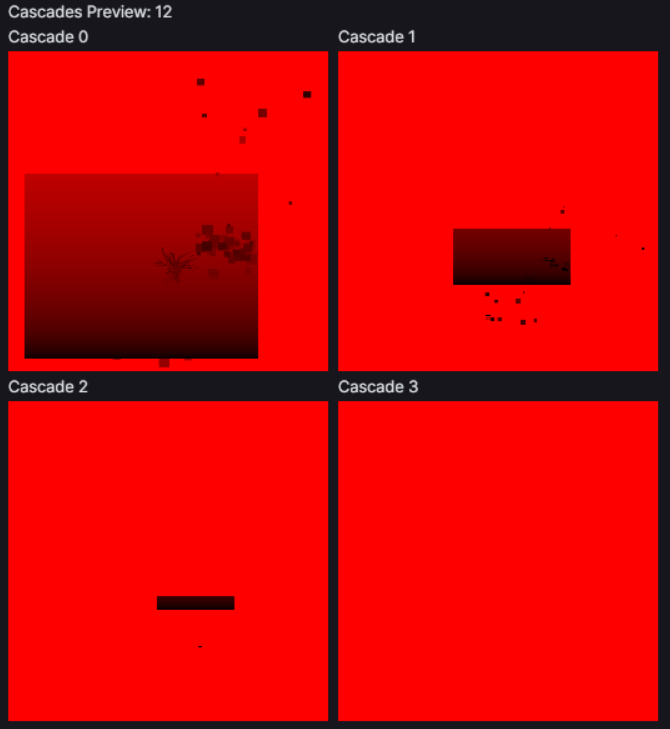
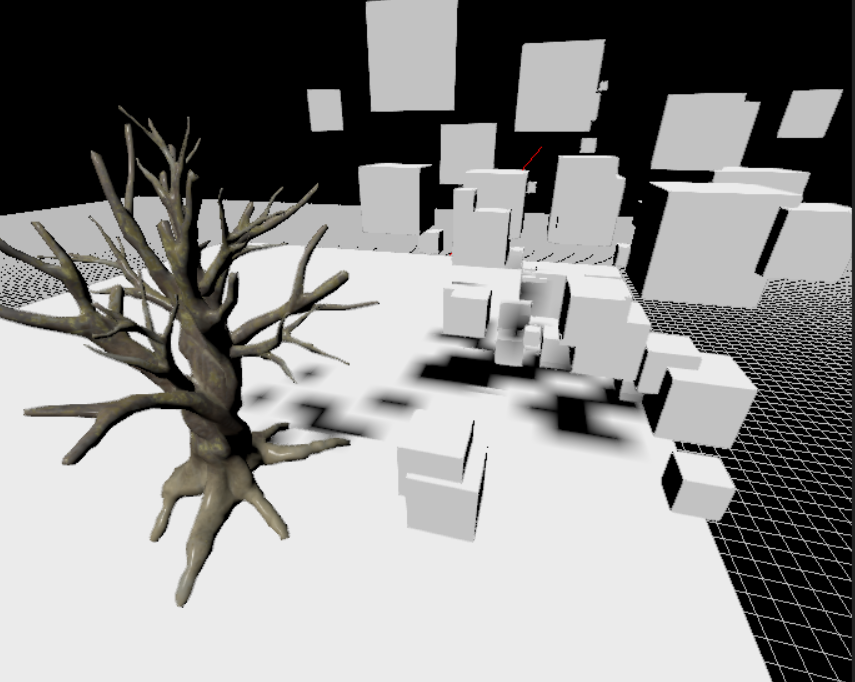
이렇게 보면 CSM의 위력을 알 수 있다!
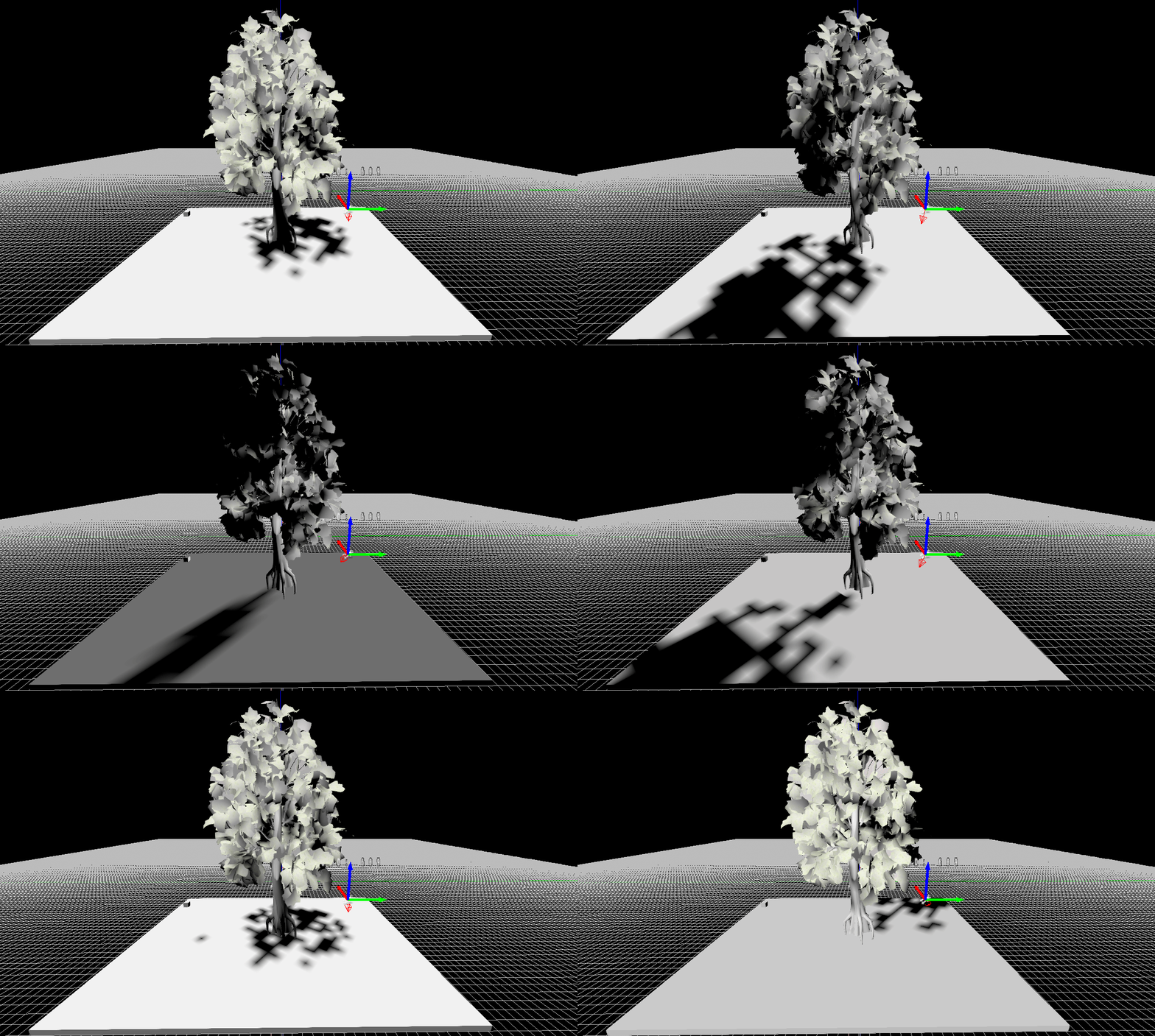

아래 이미지는 거리에 따라 나눠진 shadow map이다

'ComputerGraphics > 자체엔진' 카테고리의 다른 글
| [자체 엔진] Decal (0) | 2026.03.09 |
|---|---|
| [자체 엔진] Exponent Height Fog (0) | 2026.03.09 |
| [자체 엔진] FXAA (0) | 2026.03.09 |
| [자체 엔진] Batch Line Rendering (0) | 2026.03.09 |
| [자체 엔진] Billboard (0) | 2026.03.09 |
![[자체 엔진] Decal](http://img1.daumcdn.net/thumb/C300x300/?fname=https%3A%2F%2Fblog.kakaocdn.net%2Fdna%2F2YLiL%2FdJMb99Mi1W7%2FAAAAAAAAAAAAAAAAAAAAAMLIZvhIkLMWPq8zDDFGVfPSfkpfOjMgCL25nwAII-X8%2Fimg.png%3Fcredential%3DyqXZFxpELC7KVnFOS48ylbz2pIh7yKj8%26expires%3D1782831599%26allow_ip%3D%26allow_referer%3D%26signature%3D3ayHcwhKOlXlVw34mfO3QSKgzj4%253D)

![[자체 엔진] Exponent Height Fog](http://img1.daumcdn.net/thumb/C300x300/?fname=https%3A%2F%2Fblog.kakaocdn.net%2Fdna%2FbJgF11%2FdJMcad2dbbK%2FAAAAAAAAAAAAAAAAAAAAAGO_0iq4VWVNwuNVb0hIzCTmC8FfD0MX9xoz0RKUM78k%2Fimg.gif%3Fcredential%3DyqXZFxpELC7KVnFOS48ylbz2pIh7yKj8%26expires%3D1782831599%26allow_ip%3D%26allow_referer%3D%26signature%3D7viJY5mGd00GibdbZOGf7WPzsT0%253D)
![[자체 엔진] FXAA](http://img1.daumcdn.net/thumb/C300x300/?fname=https%3A%2F%2Fblog.kakaocdn.net%2Fdna%2FbAT7vF%2FdJMcabwBa4z%2FAAAAAAAAAAAAAAAAAAAAANTfp9Zew6klt4YVGu-SqH4xSrU0uropXBqwQAdMjSpn%2Fimg.png%3Fcredential%3DyqXZFxpELC7KVnFOS48ylbz2pIh7yKj8%26expires%3D1782831599%26allow_ip%3D%26allow_referer%3D%26signature%3DmXtlUq%252FTkNYmxj4Iek26oJ%252B6Iqk%253D)